Hacker Typer
 Traffic Rider
 Blackjack
 On On Dash
 Territory War 3
 Trench Runner
 Giant Tic Tac Toe
 Retro Bowl
 Merge Fruit
 Capybara Collector
 Backflipper
 Papery Planes
 Perfect Piano
 Dunkers Fight 2P
 TopGuns.io
 Fly Car Stunt
 Confront
 Sprinter
 Nature Strikes Back
 Dumb Ways to Die 2
 Hungry Shark Arena: Horror Night
 Fearless Rider
 Blumgi Castle
 Rolling Ball
 Mutazone
 Bee Connect
 Endless Siege
 Snakes And Ladders
 Sink It
 Crab & Fish
 Heroes of Match 3
 Mahjoctopus
 Moto X3M
 Space Waves
 Paper.io 2
 PolyTrack
 Deadshot.io
 Golf Orbit
 Capybara Clicker
 Slope 3
 Electron Dash
 Geometry Dash Bloodbath
 Basketball Stars
 Subway Surfers: Haunted Hood
 Color Tunnel
 Geometry Dash Deadlocked
 Geometry Dash Breeze
 Car Racer
 Curve Rush
 ICEY
ICEY
 Cubes 2048
 Death Run 3D
 Bus Stop Jam
 Basket Random
 Geometry Jump 2
 Geometry Dash Lite
 Geometry Dash Subzero
 Dreadhead Parkour
 Long Board Crasher
 Slope Game
 Happy Wheels
 Marble Run 3D
 Geometry Dash Scratch
 Subway Surfers Lucy
 Sprunki Survival
 Alone on Island
 Geometry Dash Spam
 Red Ball 4
 Candy Crush
 Geometry Jump
 Tap Road
 Geometry Dash 3D
 Metal Shooter Slug
 Hexa Puzzle
 Geometry Dash Meltdown
 Geometry Vibes
 Tap Tap Shots
 Red Ball 4: Volume 3
 Geometry Dash World
 Slope Ball
 Run 3
Run 3
 Milk The Cow
 Block Jam
 Slope Run
 Red Ball 4: Volume 2
 Raft Wars
 Slope 2
 Drift Boss
 Apple Worm
 Cookie Clicker City
 Impossible Bus Stunt
 Bank Robbery 2
 Galaxy Shooter
 Happy Glass
 Fantasy Helix
 Math Cross
 Tic Tac Toe
 Geometry Arrow
 Bloons Tower Defense
 RPG Pixel Hero: Crimson Quest
 Hero Clicker
 Metal Wing
 Woodnuts Bolts Puzzle
 Thumb Wars
 Block Blast
 Helix Jumping
 Jelly Merge
Hacker Typer – An Immersive Typing Simulation for Gaming Enthusiasts
Understanding the Core Experience
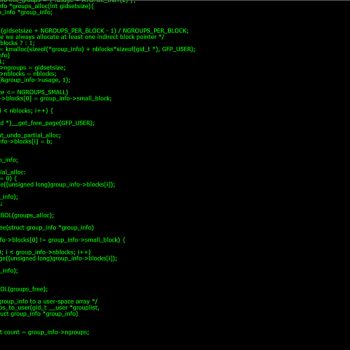
Hacker Typer offers a unique digital playground where the act of typing becomes a visual performance. The game presents a screen that mimics a sophisticated computer terminal. As the player presses keys, lines of code appear instantly, creating the illusion of rapid hacking activity. This design appeals to individuals who enjoy the aesthetic of cyber intrigue without the need for actual programming knowledge.
Visual Presentation and Atmosphere
The interface is built to resemble a dark console with glowing text. The color palette, font style, and scrolling effect all contribute to a sense of immersion. Background music or ambient sound may accompany the session, enhancing the feeling of being inside a secret operation center.
Player Motivation and Goals
Although there is no explicit win condition, the primary motivation is personal satisfaction. Players often set their own challenges such as maintaining a steady flow of characters, creating long uninterrupted code blocks, or simply enjoying the spectacle for an audience. The experience can also serve as a lighthearted way to practice typing speed in a fun environment.
Getting Started with Hacker Typer
New players can begin by opening the game in a web browser. The interface loads quickly and does not require any installation. Once the terminal appears, the player can start pressing any keys on the keyboard. Each keystroke triggers a predefined segment of text that scrolls upward, giving the impression of a live hacking session.
Basic Interaction Tips
- Focus on maintaining a rhythm rather than aiming for perfect accuracy. The game does not penalise mistakes.
- Experiment with different typing speeds to discover the most enjoyable pace.
- Observe the visual feedback; the speed of text generation may increase as more keys are pressed in quick succession.
Enhancing the Session
Players often enhance the experience by adjusting the volume of background sounds or by using headphones for a more immersive feel. Some users like to share their screen with friends to showcase the dramatic effect of rapid code generation.
Strategies for a Satisfying Playthrough
Even without formal objectives, there are ways to deepen the enjoyment of Hacker Typer. One approach is to treat each session as a personal performance. By setting a timer, a player can aim to fill the screen with as many lines of code as possible before the time expires. Another method is to combine the game with a real typing practice routine, using the visual feedback as motivation to increase speed.
Creating a Comfortable Environment
Choose a quiet location where the ambient sounds of the game can be heard clearly. Adjust the screen brightness to reduce eye strain during extended sessions. If the player wishes to record the experience, screen capture software can be used to create short clips for sharing on social platforms.
Exploring Community Content
Many online forums discuss personal achievements and share tips for creating the most impressive visual displays. Engaging with these communities can provide fresh ideas for challenges and inspire new ways to enjoy the game.
Replay Value and Long Term Appeal
The simplicity of the core mechanic ensures that each play session feels fresh. Because there is no fixed endpoint, players can return to the game whenever they desire a quick diversion or a longer immersive experience. The lack of complex rules means the barrier to entry remains low, inviting both casual gamers and dedicated typing enthusiasts.
Potential for Creative Use
Some users incorporate Hacker Typer into live streams or presentations, using the visual output as a backdrop for discussions about cybersecurity or digital culture. This creative application adds another layer of value beyond the immediate gameplay.
Frequently Asked Questions
Is there a need for prior coding knowledge to enjoy the game?
No prior coding knowledge is required. The game generates text automatically, allowing anyone to experience the feeling of a high‑tech terminal without learning programming languages.
Can the game be played on mobile devices?
The game is primarily designed for desktop browsers, but many mobile browsers support the same functionality. The experience may differ due to the size of the virtual keyboard.
Are there any in‑game purchases or advertisements?
The game is typically offered as a free experience. Some versions may display advertisements, but there are no mandatory purchases to access the core features.
How can I improve my typing speed while using Hacker Typer?
Focus on maintaining a steady rhythm and avoid looking at the keyboard. Over time the visual feedback will help develop a natural flow, which can translate into faster typing in other contexts.
Is it possible to customize the appearance of the terminal?
Some implementations allow users to change color schemes or background images. Check the settings menu within the game for any available customization options.