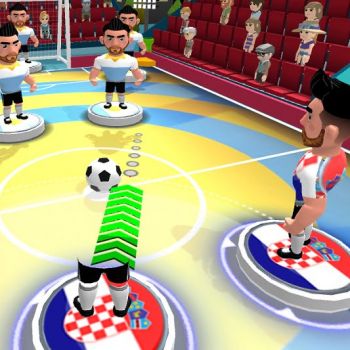
Overview of Stick Soccer 3d
Stick Soccer 3d brings the excitement of a football match to a simple stick figure world. The game presents a three dimensional arena where each player controls a minimalist avatar that moves across a green pitch. The visual style is clean and easy to read, allowing the focus to remain on the flow of the match. Even without a detailed storyline the game offers a clear objective: move the ball into the opponent net more often than the opposition does.
The design of the arena encourages quick decision making. The ball rolls smoothly over the surface and reacts to player contact in a realistic manner for a game of this style. The lack of complex graphics means the game runs well on a wide range of devices, making it accessible to anyone who enjoys a quick match of virtual football.
How to Enjoy the Game
Because the game does not provide a list of specific button assignments, the best approach is to explore the on screen prompts that appear at the start of each match. Most browsers or mobile platforms will map basic actions such as moving forward, turning left or right, and kicking the ball to intuitive keys or touch gestures. Experiment with the controls in a practice session before joining a competitive match.
Finding the Right Pace
The three dimensional view can feel different from a traditional top down soccer game. Take a moment to adjust the camera angle so that you can see both your avatar and the ball clearly. A comfortable view helps you judge distances and timing for passes and shots.
Understanding the Flow of Play
The game rewards players who keep the ball moving. Short passes that maintain possession are often more effective than long kicks that give the opponent a chance to intercept. Look for open space near the edges of the field where you can receive a pass without immediate pressure.
Tips for New Players
New players can improve quickly by focusing on a few core habits. First, always keep an eye on the position of the opponent goal. Positioning yourself slightly behind the ball gives you a better angle for a shot. Second, use the edges of the field to your advantage. When the ball is near the sideline you can create a one on one situation that forces the defender to choose between blocking the shot or covering a pass.
Practice Defensive Positioning
Defending in Stick Soccer 3d does not require complex tactics. Simply stay between the ball and your own goal. When the opponent approaches, move laterally to block their path and wait for an opportunity to take the ball away. Patience often leads to a turnover.
Take Advantage of Free Kicks
If the game awards a free kick after a foul, use the moment to set up a shot from a favorable distance. Align your avatar so that the ball travels directly toward the goal and time your kick to avoid the goalkeeper’s reach.
Common Questions
What type of device can I play Stick Soccer 3d on?
The game is designed to run on web browsers and mobile platforms. It does not require a powerful graphics card, so most smartphones, tablets, and computers can handle it without difficulty.
Is there a multiplayer option?
Stick Soccer 3d offers a mode where you can compete against other players online. The matchmaking system pairs you with opponents of similar skill level, providing a balanced and enjoyable experience.
How can I improve my scoring rate?
Focus on positioning your avatar near the goal when you have possession. Look for opportunities to shoot from angles that limit the goalkeeper’s ability to react. Practicing short passes also helps you create clear chances.
Can I customize my avatar?
The game features a simple stick figure representation that does not include extensive customization options. The emphasis is on gameplay rather than visual personalization.
What should I do if I feel the controls are unresponsive?
First check that your browser or device is up to date. Clearing the cache or restarting the application can also resolve minor performance issues. If problems persist, try using a different device to see if the experience improves.